Product Updates

Every new AI tool, feature, and improvement shipping on GoStudio.ai — newest first. Page 5 of 6.

v2.0.0

New Feature — A Brand-New Studio

New FeaturePlatform

New Feature — A Brand-New Studio

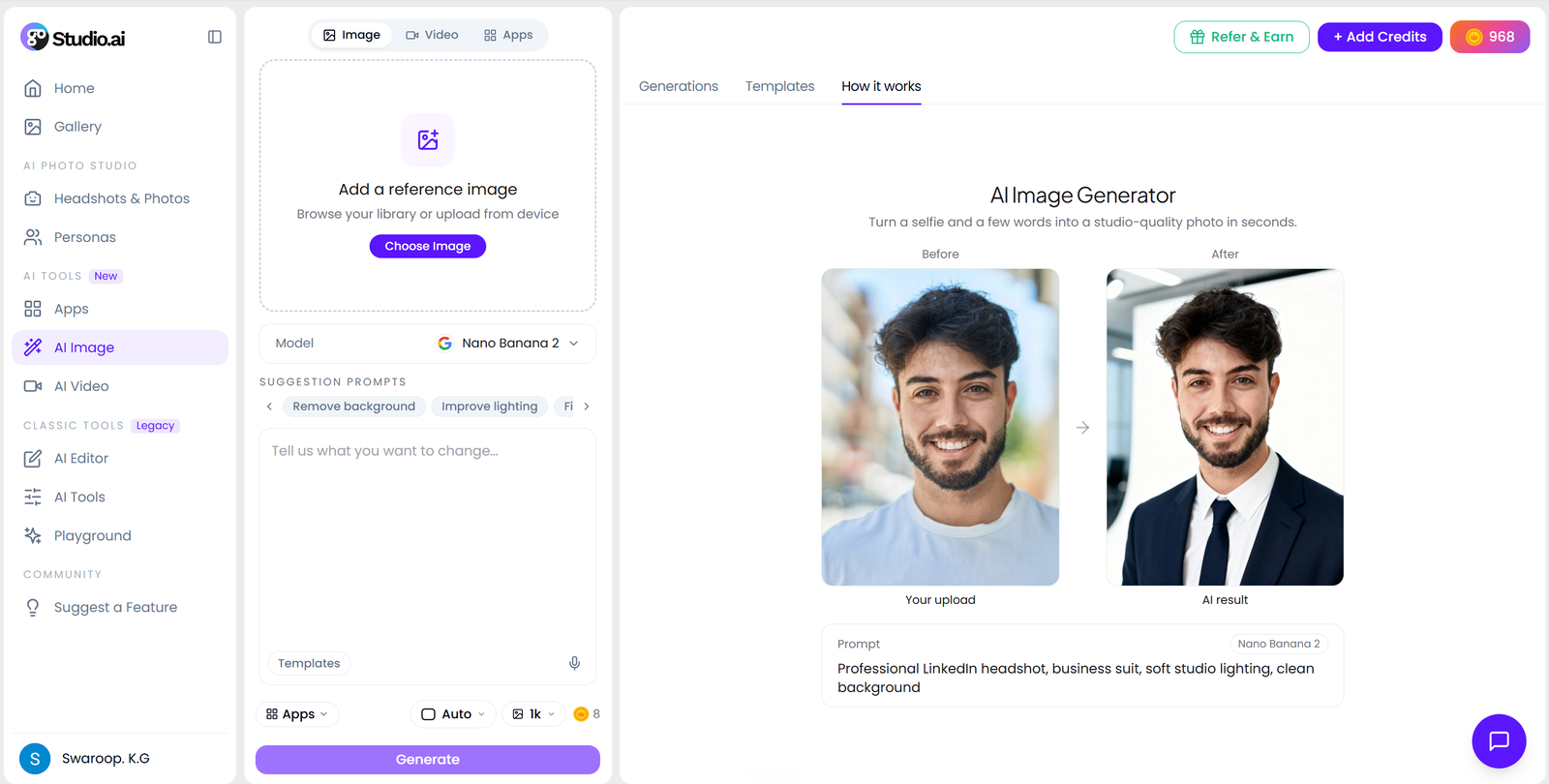
Every page inside the app has a new interface. The AI tools no longer live on their own separate pages — they have moved into Apps, and image and video each get a single workspace: create and edit in AI Image, generate and edit in AI Video.

The rebuilt GoStudio studio — sidebar, AI Image workspace and the generations panel on one screen

What’s New

  • AI tools moved into Apps — every tool now opens from the Apps panel inside the studio instead of its own standalone page.
  • AI Image — create and edit in one place: generate a new image or edit an existing one without switching screens.
  • AI Video — generate and edit in the same workspace, the same way image works.
  • New interface throughout — the inside pages share one layout, with your generations in a live panel where you can compare, like, share or delete them.
  • Built for mobile — a new bottom nav (Home, Photoshoots, AI Editor, Apps, Gallery) and layouts that hold up on small screens.
  • Simpler addresses — image and video now live at /app/ai-image and /app/ai-video.

If you had an older tool link bookmarked, open the studio and pick the tool from the Apps panel — everything now lives one tap from the sidebar.

Open the new studio
v1.7.1

Update — Every AI Tool Page, Rebuilt

UpdatePlatform

Update — Every AI Tool Page, Rebuilt

All of our AI tool pages have been rebuilt on one design system — clearer examples, consistent typography, and real before/after sliders so you can see what a tool does before you sign up.

What’s New

  • Consistent design — every tool page now shares the same layout, type and colour system.
  • Real before/after — drag the slider on any tool page to see genuine results, not stock mockups.
  • Faster to scan — shorter headings, clearer steps, and the answer to “what does this do?” right at the top.
See the new tool pages
v1.7.0

Update — Watermark Remover Now Has Three Quality Tiers

UpdateAI Tools

Update — Watermark Remover Now Has Three Quality Tiers

Pick the trade-off that suits the job. The Watermark Remover now offers three models — Lite, Pro and Ultra — selectable from a dropdown right above the Generate button.

  • Lite

    The fastest and cheapest option, ideal for simple text watermarks.

  • ProDefault

    The balanced choice that handles most photos well.

  • Ultra

    The highest-quality pass for busy backgrounds and stubborn logos.

What’s New

  • Tier picker — switch models from a dropdown right above the Generate button, with the credit cost shown for each.
  • Same flow either way — the tool works exactly as before; the choice is one dropdown, not a different screen.
Try Watermark Remover
v1.6.1

Update — Any Angle Is Now Multiple Angles

UpdateAI Tools

Update — Any Angle Is Now Multiple Angles

The Any Angle tool has a clearer name, a new design and a new home. It is now called Multiple Angles, lives at /multiple-angles, and comes with a full examples page showing what it does across people, cars, real estate and ecommerce.

Original front-facing shot
Before
Same subject regenerated at a three-quarter angle
After

What’s New

  • Clearer name — “Multiple Angles” says exactly what the tool gives you.
  • New address — the page now lives at /multiple-angles.
  • Redesigned page — a new layout built on the GoStudio design system, with the angle results shown as a set rather than a single sample.
  • Examples page added — a dedicated gallery at /examples#multiple-angles covering people, cars & products, real estate and ecommerce.
  • Every angle in one run — front, three-quarter, profile, high, low and bird’s-eye from the same source photo.

Browse the full gallery at gostudio.ai/examples#multiple-angles to see the same subject re-shot from every angle before you try it yourself.

Try Multiple Angles
v1.6.0

New Feature — Introducing the AI Face & Body Editor

New FeatureAI Tools

New Feature — Introducing the AI Face & Body Editor

Reshape your body and refine your face from a single photo. Slim the waist, tone and sculpt, adjust height and proportions, and smooth the face — all in one place, with natural, photorealistic results and no warped backgrounds.

Full-body photo before AI reshape
Before
Same photo after AI reshape — slimmed and toned, natural background
After

What’s New

  • Slim, tone & sculpt — trim the waist, define arms and shoulders, and flatten the tummy while keeping clothing folds and posture natural.
  • Height & proportions — lengthen legs and balance full-body proportions without stretching faces or bending the floor behind you.
  • Face refine in the same pass — slim the jawline and smooth skin while keeping your features unmistakably yours.
  • No tell-tale distortion — the AI understands the body and the scene, so edges and backgrounds stay clean.

Upload once and edit everything — no jumping between a separate face editor and body editor, and no manual liquify. Free to try, no watermark.

Try the Face & Body Editor

Update — Age Modify Gets Smarter Models and the Full Age Range

Age Modify now runs on GPT Image 2 and Nano Banana 2, and covers ages 1 to 100 — so you can go back to childhood or forward to your nineties from a single photo.

Age Modify — change apparent age from a single photo

What’s New

  • Two new models — GPT Image 2 and Nano Banana 2 replace the previous engine, for noticeably better likeness.
  • Ages 1 to 100 — the full range is now available, not just adult ages.
  • Body and clothing age too — results now account for build and outfit, not just the face.
  • Background preserved — age progression keeps the original scene behind you intact.
Try Age Modify

Showing updates 2530 of 35