Product Updates

Every new AI tool, feature, and improvement shipping on GoStudio.ai — newest first. Page 3 of 7.

v2.7.0

New Feature — Every Generation Path, Now Open

New FeatureAI Tools

New Feature — Every Generation Path, Now Open

Every way of generating is now unlocked. Start from text, an image or a video, and finish as either an image or a video — all five paths are live. Seedream also moves up to 5 Pro, and AI Image now takes up to four reference images at once.

  • Text to Image

    Describe what you want and get a still image back.

  • Image to Image

    Start from a photo you already have and restyle, extend or edit it.

  • Text to Video

    Write a scene and generate it as a clip from scratch.

  • Image to Video

    Bring a still image to life as a moving shot.

  • Video to Video

    Feed in a clip and restyle or rework it while keeping the motion.

What’s New

  • All five generation paths unlocked — nothing is held back behind a coming-soon label any more.
  • Seedream upgraded to 5 Pro — the image model jumps from 4.5 to 5 Pro, with no change to how you use it.
  • Up to 4 reference images — AI Image now accepts four references in a single generation, for tighter control over style, subject and composition.
Open the studio

Update — Pick Any Background Colour for Video Background Removal

Removing a video background no longer means settling for a default. Choose the exact colour you want and the AI drops it in behind your subject as the original background comes out.

Before
After — Transparent
After — Blue

What’s New

  • Colour picker built in — choose any background colour instead of being locked to a fixed default.
  • Applied as it removes — the new colour is composited in the same pass, so there’s no second export step.
  • Clean edges — hair and outline detail stay sharp against the colour you pick.
Open the AI Video Editor
v2.6.0

Update — Watermark Remover Moves to a Single Page

UpdateAI Tools

Update — Watermark Remover Moves to a Single Page

Upload, remove, compare and download — all without leaving the page. The Watermark Remover no longer bounces you between screens, and a dedicated upload page lets you start straight from a link.

Photo with a visible watermark across it
Before
Same photo with the watermark removed, background intact
After

What’s New

  • Everything on one page — upload, preview the result and download without navigating away.
  • Dedicated upload page — go straight to /watermark-remover/upload when you already have the file ready.
  • Refreshed interface — a cleaner navbar and layout built around the single-page flow.
  • Clearer errors — if a download link is missing you get a plain-English message instead of a silent failure.
Try Watermark Remover
v2.5.0

Update — Age Modify Now Has Two Modes

UpdateAI Tools

Update — Age Modify Now Has Two Modes

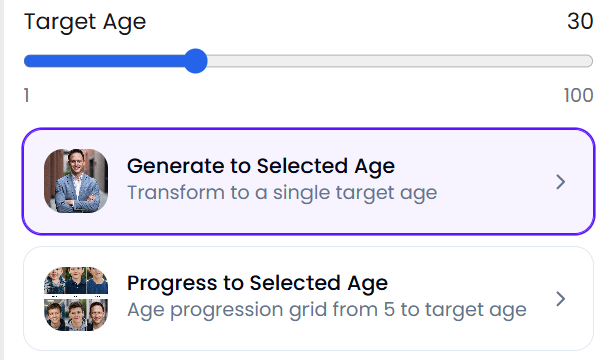
Age Modify now lets you choose how you travel through time: pick one exact age, or generate a progression across several ages in a single run.

The two Age Modify modes in the app — Generate to Selected Age and Progress to Selected Age, under the target-age slider

What’s New

  • Selected Age — set one target age and get a single result at exactly that age.
  • Age Progression — see yourself across several ages in one go, ideal for side-by-side comparisons.
  • Model picked for you — the right model is now chosen automatically from the age you set, so the Lite/Pro toggle is gone.
Try Age Modify
v2.4.1

New Feature — Omni Video and Seedance 2 Join the Studio

New FeatureAI Tools

New Feature — Omni Video and Seedance 2 Join the Studio

Two new video models are now available — Omni Video for longer, more controllable clips, and Seedance 2 at 480p for fast, low-cost drafts before you commit to a full render.

What’s New

  • Omni Video — a new model with finer control over how your clip is generated.
  • Seedance 2 at 480p — a quicker, cheaper option for testing an idea first.
  • Credits match duration — Omni Video is priced from clip length, so you only pay for what you actually generate.
Generate a video
v2.4.0

New Feature — Request Features, and See What Every Tool Does

New FeaturePlatform

New Feature — Request Features, and See What Every Tool Does

Tell us what to build next, and like the ideas you want most — every suggestion on the new Feature Requests page comes from a GoStudio.ai user. Tooltips landed in the same release, so you can also see what any tool does before you open it.

  • Post your idea

    Tell us what would make GoStudio.ai better for you. A sentence is enough.

  • The community backs it

    Your idea goes live for every GoStudio.ai user to see and like. The most-liked ideas rise to the top.

  • We build it together

    We review the top requests when planning what ships next. GoStudio.ai is shaped by the people who use it.

What’s New

  • Feature Requests page — a new page at /app/feature-requests where every idea is public and every user can back one.
  • Comment on ideas — add your thoughts to a suggestion, not just a like.
  • Tooltips on every tool — hover a tool to see what it does without having to open it first.
Suggest a feature

Showing updates 1318 of 37